

MiRA 26.04 - Audio Analysis for the Future
The MiRA 26.04 update redefines fast intelligent audio analysis, providing AI powered Auto EQ, advanced real time workflows, and smarter capture tools, making system tuning quicker, more accurate, and more accessible than ever, with support for unlimited number of input streams for MiRA Studio and Live.
The MiRA 26.04 is a free update for all users with a valid MiRA perpetual license or active MiRA subscription plan and is available now in FLUX:: Center.
WHAT'S NEW?
See full release notes here
New MiRA scope: Auto EQ - for Fast and Accurate System Tuning
The new MiRA scope introduces AI‑powered Auto EQ, enabling fast, accurate and consistent system tuning of up to 24 channels by automatically generating EQ based on defined target curves.
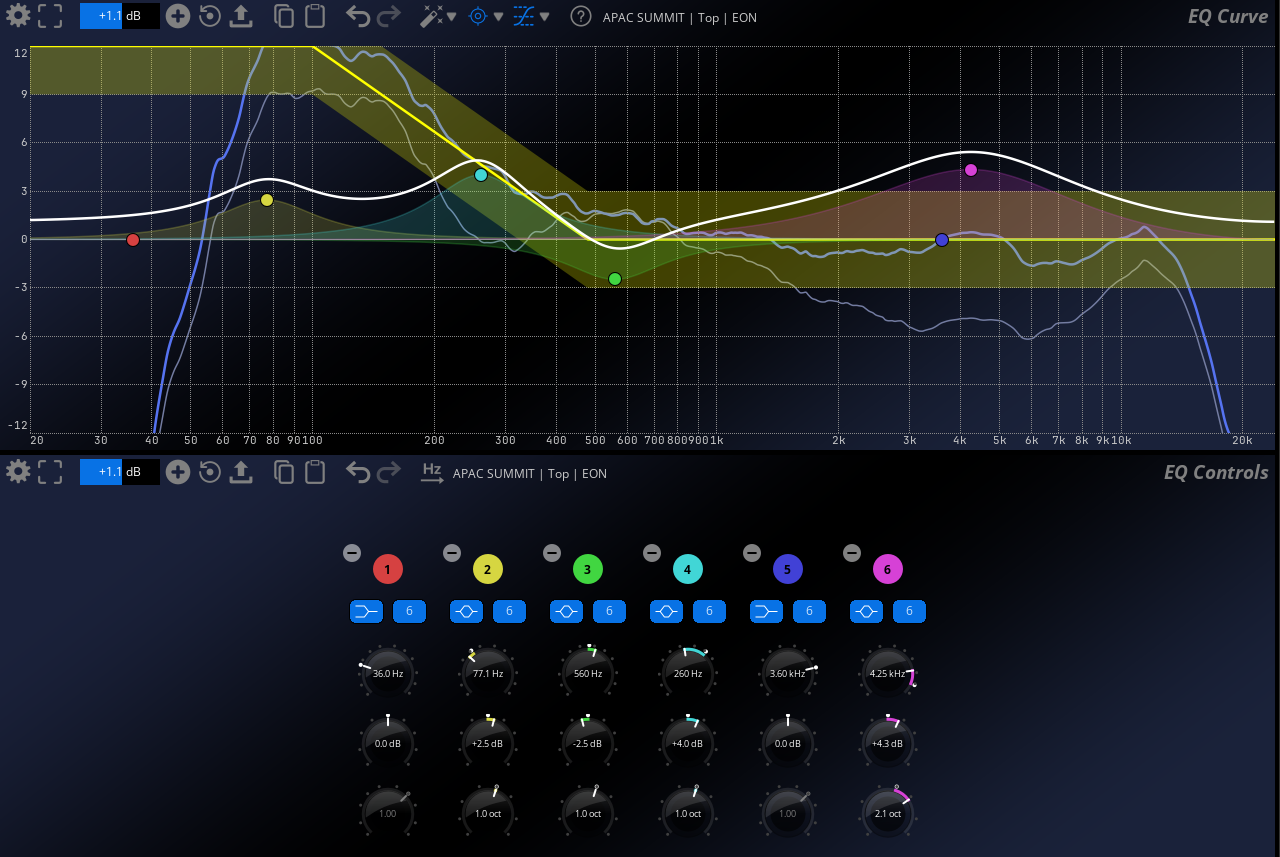
- AI‑based Auto EQ
Define target curves and let MiRA automatically generate optimized EQ using a unique AI‑driven algorithm. - HARMAN target curve support
Native support for HARMAN target curves ensures consistent, reference‑quality tuning. - Accessible for all skill levels
Less experienced integrators can achieve reliable, high‑quality results with minimal manual intervention. - Improved tuning consistency
Helps ensure better and more predictable system performance across installations. - Advanced post‑processing EQ generation
EQ generated from measured curves, with multiple algorithms available. - Seamless workflow integration
Generated EQ can be exported directly to SPAT Revolution and Eclipsa Audio LPIF format, among other things, reducing workflow fragmentation.
Real-Time Handling of Multiple Simultaneous Input Streams
MiRA supports real‑time handling and analysis of multiple simultaneous input streams, enabling complex productions to be monitored and controlled with confidence and precision.
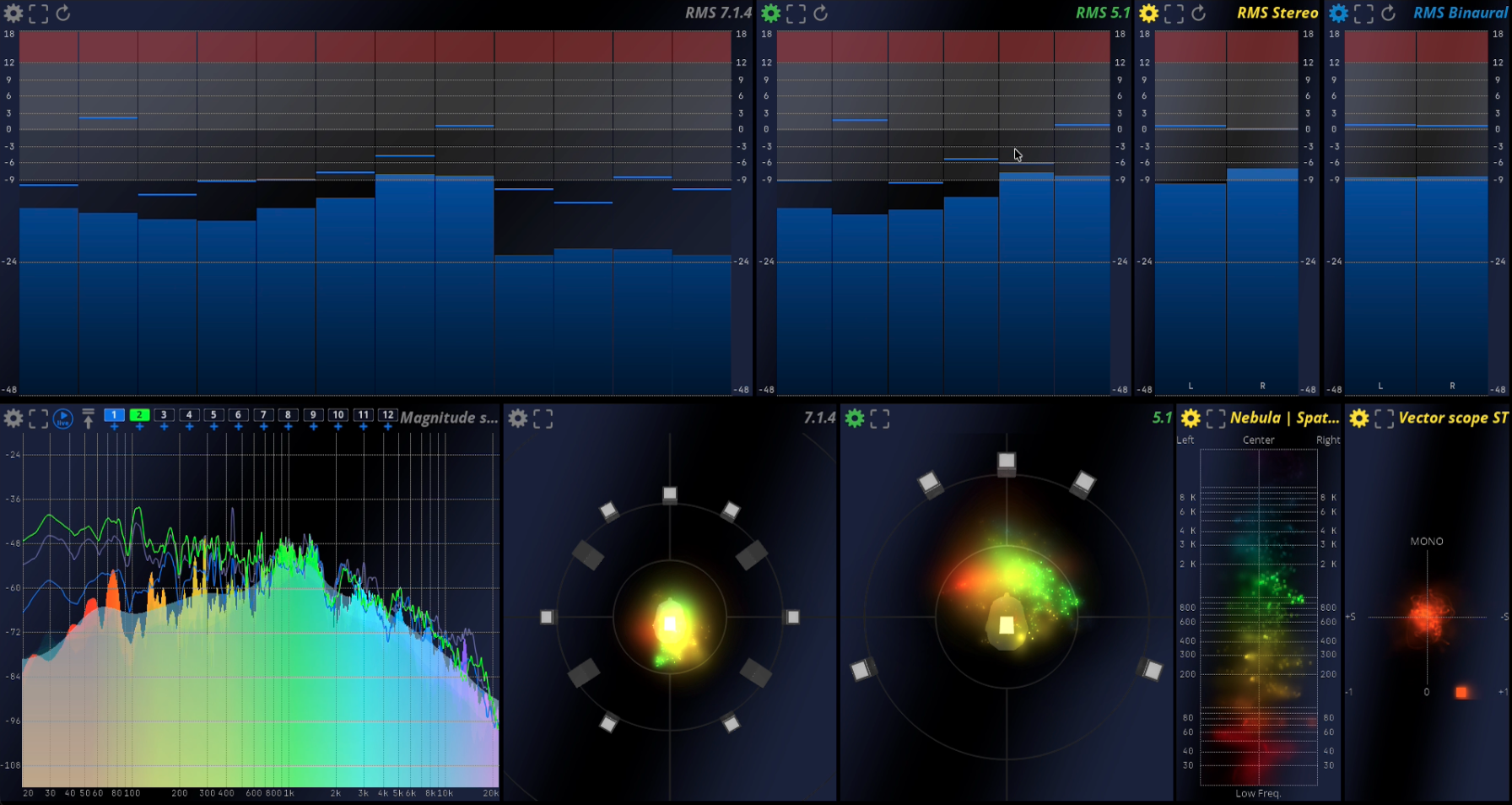
- Multiple simultaneous input streams
Support for an unlimited number of input streams, with up to 24 channels per stream (Studio and Ultimate licenses). - Real‑time parallel analysis
Each stream can be analyzed simultaneously using multiple real‑time analysis tools. - Built for complex workflows
Ideal for productions requiring parallel monitoring of multiple sources without compromising performance or responsiveness.
Improved measurement workflow (for MiRA Live and Ultimate licenses)
A significant measurement workflow improvement in MiRA simplifies and automates advanced measurement tasks, enabling faster comparison, analysis and repeatable system tuning for Live and Ultimate users.
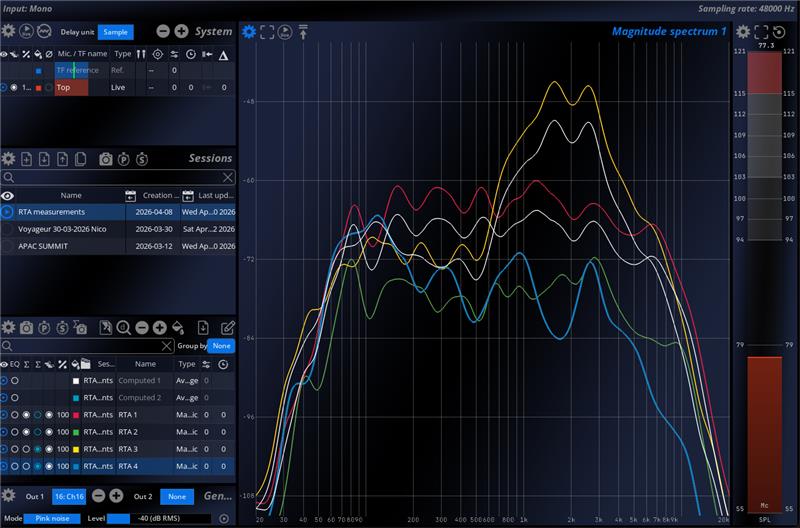
- Multiple computed curves per session
Create up to 4 computed curves per session and assign captures to one or multiple curves. - Simultaneous average monitoring
Monitor and compare up to 4 computed averages in real time for deeper system insight. - RTA‑based measurements without reference signal
Measure and capture also RTA data in addition to Transfer Functions, enabling measurements without a reference signal. - Automated sequential captures
New “New sequential captures” action allows automated measurement sequences. The user can define signal type, number of captures, and wait time. - Improved visual clarity
New auto‑color capture system, enabled by default, improves readability and workflow speed.
Improved Loudness metering scope
The improved Loudness Metering Scope provides clearer insight into dynamics and headroom with new Peak-to-Loudness Ratio (PLR) and Peak-to-Short-Term Loudness Ratio (PSR) metrics, delivering more meaningful loudness analysis at a glance.
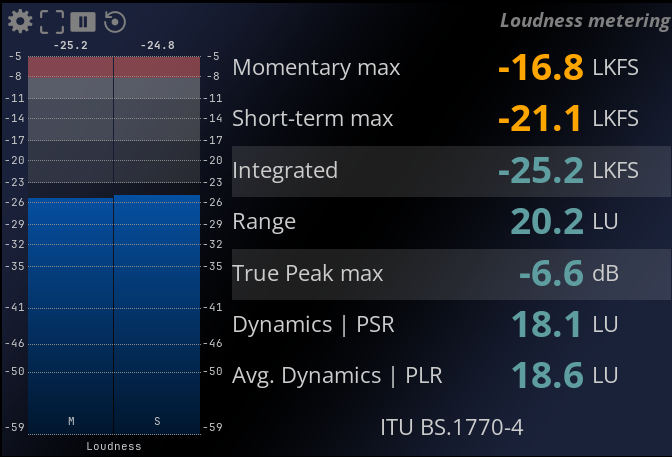
- New loudness ratios
Introduction of Peak‑to‑Loudness Ratio (PLR) and Peak‑to‑Short‑Term Loudness Ratio (PSR) for better insight into dynamic behavior. - Enhanced visualizations
Clear PSR and PLR visualizations make it easier to assess loudness consistency and peaks. - Updated UI
Refreshed user interface for a clearer, more readable overview of all loudness values.
Additional Improvements
Additional system improvements enhance usability and workflow efficiency.
- New I/O Setup Page - Simplified and clearer configuration of system inputs and outputs.
- Daylight Mode - New UI mode optimized for use in bright environments.
- General UX improvements - Various performance, usability and workflow refinements across the application.
RESOURCES

Online User Guide

Download & Install

License & Activation

Release Notes

Facebook Analyzer Group